
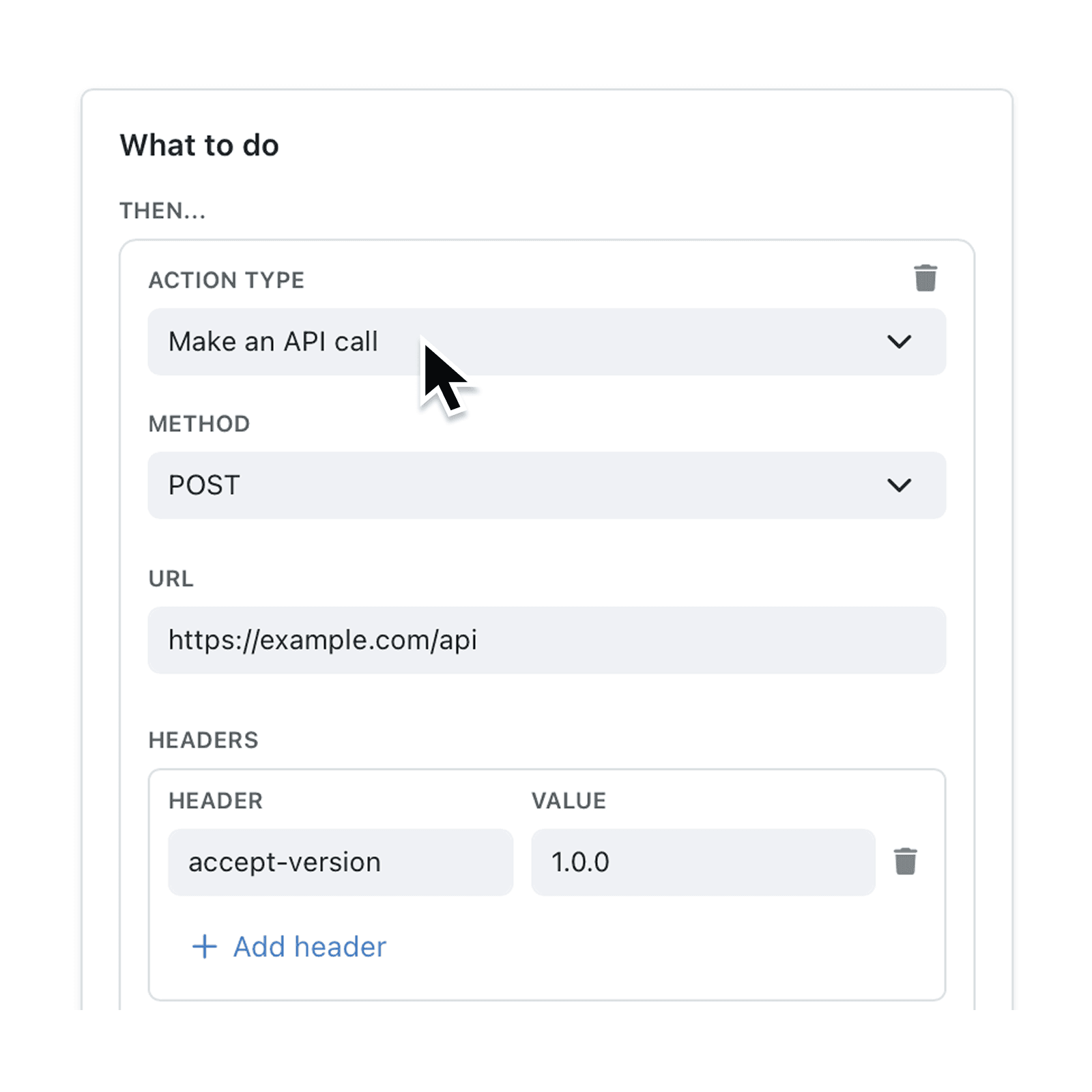
Stop switching platforms to keep data in sync. The Make an API call automation step pushes real-time updates from Kinabase to any external service, so information flows automatically and teams stay aligned.
Need to trigger an external system, send data to another platform,or call a bespoke API whenever a record changes? The Make an API call step fits into any Automation, sending HTTP requests with dynamic values drawn from your records. You choose the method, headers and body – we handle the rest. It’s the simplest way for SMEs to integrate Kinabase with the wider toolstack, without waiting on developers.
Why it matters:
- Break data silos – keep external apps current without manual exports.
- Cut busywork – save hours each week by removing copy-paste tasks.
- Scale processes – trigger limitless services, from SMS gateways to bespoke systems.
How it works:
- In Automations, add a new action and pick Make an API call.
- Enter the URL, choose the HTTP Method, and set any Headers.
- Build the body as plain text or JSON, inserting field expressions where needed, then save.
When to use it:
- Operations Managers who need records in Kinabase to update finance or helpdesk tools automatically.
- IT Admins connecting on-premise systems to cloud workflows.
- Marketing Managers to post to websites & social media automatically.
Try it now in Kinabase → Automations → API Call.
Have feedback? Email support@kinabase.com — we’re listening.