
Typing duration values manually can be slow and error-prone, especially when your team uses the same time periods repeatedly. Whether you're logging billable hours in 6-minute increments or tracking project phases in standard day counts, entering numbers takes time and invites mistakes.
What's New:
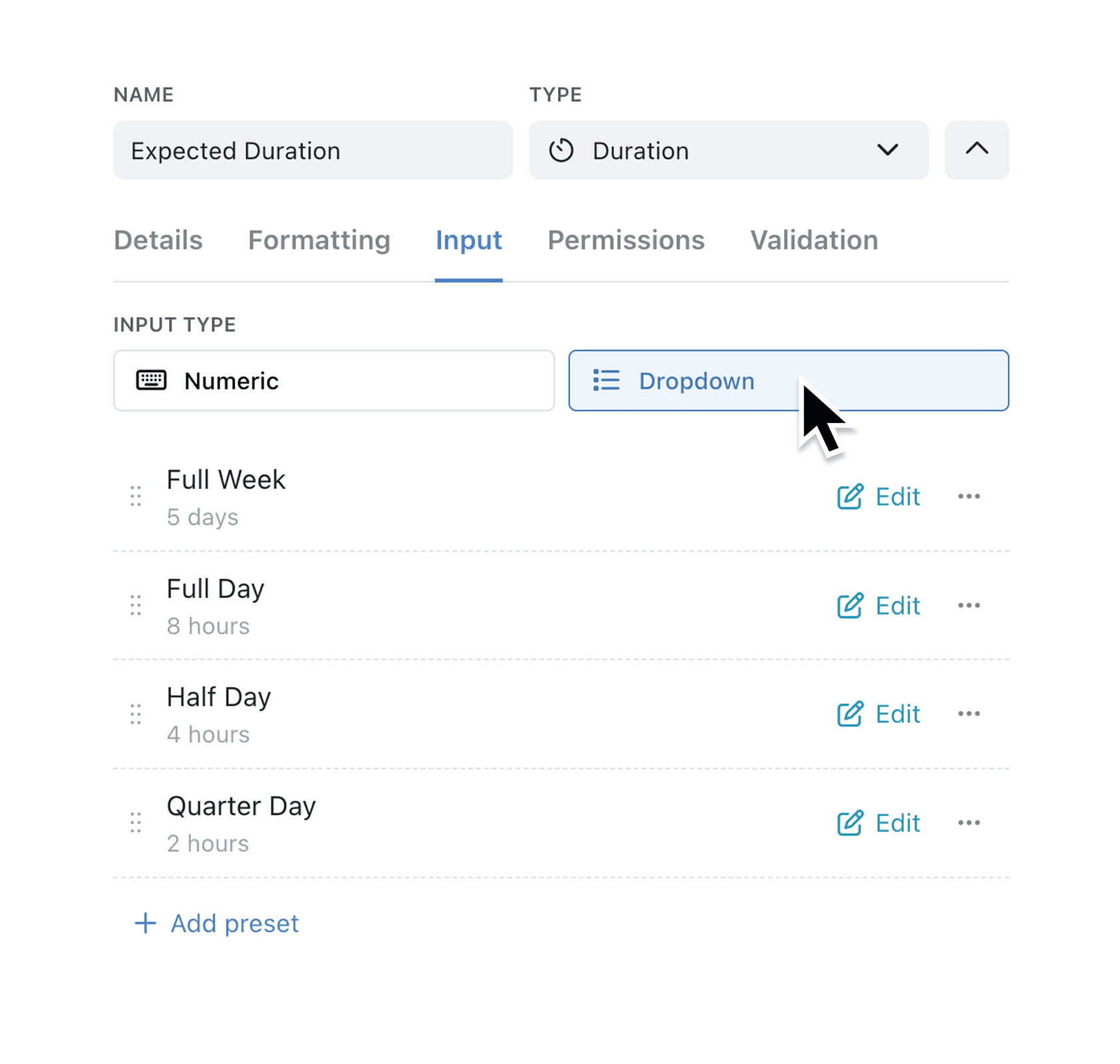
Duration fields now support a dropdown input mode alongside the traditional numeric entry. When you configure a duration field, you can choose between Numeric (the default) or Dropdown input. With Dropdown selected, you define preset duration options—such as "15 minutes", "1 hour", or "1 day"—that users pick from a simple list. Each preset has a label you control and a duration value stored in the appropriate units.
Why it matters:
- Speed up data entry by letting users select common durations with a single click instead of typing values
- Reduce errors by offering only valid, pre-approved time increments that match your business rules
- Enforce consistency across your team by defining standard duration options everyone uses
- Maintain flexibility by adding, editing, reordering, or removing presets at any time through the field editor
How it works:
- Open your Collection and navigate to Fields in the configuration menu.
- Add a new Duration field or edit an existing one.
- Expand the field editor and select the Input tab.
- Switch the Input Type from Numeric to Dropdown.
- Add your preset durations by entering a label (e.g., "Half day") and choosing the value using the number input and unit selector.
- Save the field. Users will now see a dropdown instead of a number input when entering data.
Note: When you switch to Dropdown mode, Kinabase automatically creates a sensible default preset if you haven't defined any. At least one preset is required for the dropdown to work.
When to use it:
- Professional services firms can configure 6-minute billing increments (0.1 hours) as preset options, matching legal and consulting industry standards for time tracking.
- Project managers can define standard sprint durations like "1 week" or "2 weeks" for planning fields, ensuring consistency across all project records.
- HR teams can set up leave request durations with options like "Half day", "1 day", or "1 week" to streamline absence management.
Head to any Collection with a Duration field and try the new dropdown input mode. Define the preset values that match your workflows and watch your team enter data faster with fewer mistakes.
Try it now in Kinabase → Collections → Fields → Duration
If you have questions or feedback, we would love to hear from you. Email support@kinabase.com — we’re listening.