
When records need different descriptions based on their data, manually writing each one wastes time and introduces errors. Imagine a parts catalogue where capacitors need one description format and resistors need another, or a project tracker where high-priority tasks require different labelling than routine ones.
What's New:
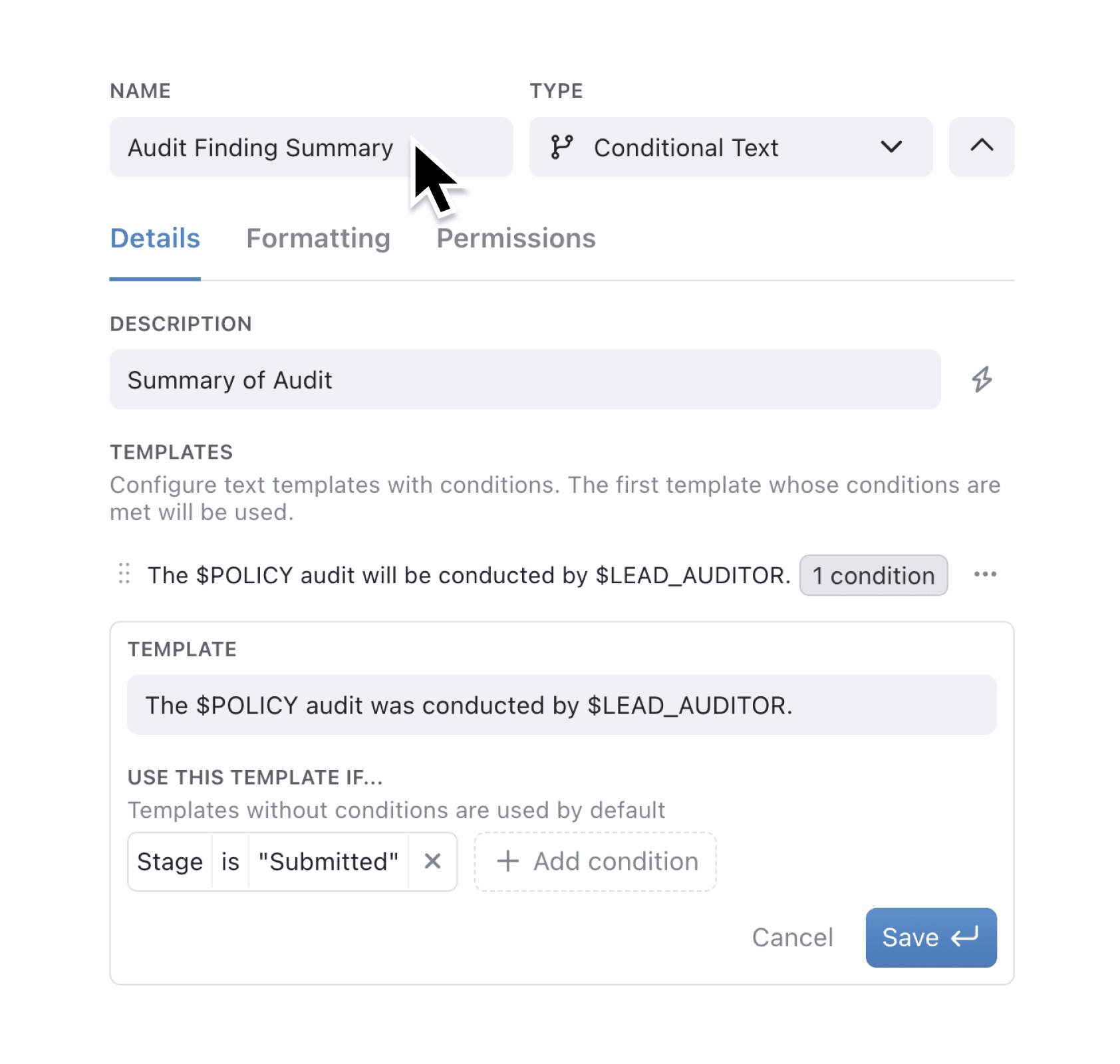
Conditional Text is a new field type that automatically generates text based on conditions you define. Create multiple templates, each with its own set of conditions, and Kinabase selects the first matching template for each record. Templates can include field references like $PRODUCT_NAME or $PRIORITY, which are replaced with actual values when displayed.
Why it matters:
- Automate context-aware descriptions by defining different text formats for different record types, eliminating manual data entry and ensuring consistency across your data.
- Maintain data quality with templates that always follow your defined structure, preventing typos and formatting inconsistencies that creep in with manual entry.
- Configure visually with clear feedback using a dedicated interface that shows condition counts, identifies default templates, and warns when templates will never be selected.
- Stay flexible with ordered conditions where the first matching template wins, allowing you to build sophisticated logic from simple rules without complex formulas.
How it works:
- Open your collection and go to Configure, then Fields.
- Click Add field and select Conditional Text from the Computed category.
- Give your field a name and click Add template to create your first template.
- Enter your template text using
$FIELD_NAMEsyntax to reference other fields (for example,"Product: $PART_NUMBER"). - Add conditions using the filter builder to specify when this template should be used. Templates without conditions act as the default fallback.
- Add additional templates and reorder them as needed. The first template whose conditions are met will be used.
When to use it:
- Product managers can generate consistent product descriptions that vary by category. A single Conditional Text field might show "Capacitor: 100µF $VOLTAGE" for capacitors and "Resistor: $RESISTANCE Ω $TOLERANCE%" for resistors.
- Operations teams can create priority-based task labels that automatically reflect urgency. High-priority items display "URGENT: $TASK_NAME" while routine tasks show just the task name.
- Sales teams can build dynamic quote summaries that adjust based on deal stage, showing different messaging for prospects versus near-close opportunities.
Get started today
Conditional Text fields are available now in all workspaces. Open any collection, add a new field, and select Conditional Text to start creating dynamic, condition-based text.
Try it now in Kinabase → Collections → Fields → Conditional Text
If you have questions or feedback, we would love to hear from you. Email support@kinabase.com — we’re listening.