
Keeping SharePoint folders in step with your records used to mean clicking through each record to check where files would land. That is slow when you have hundreds of records and risky when folders need to exist before files are uploaded.
What's new:
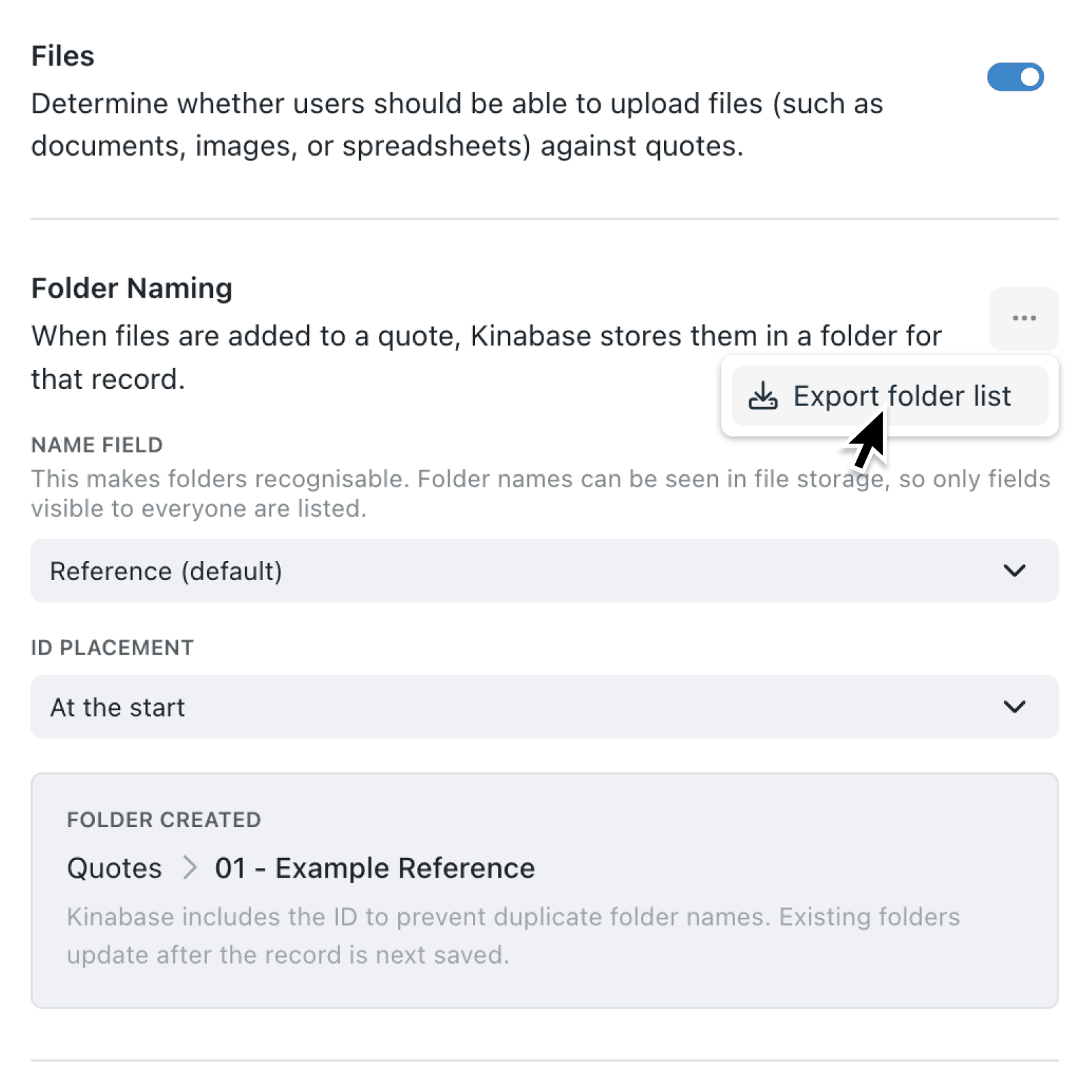
You can now export a CSV of the expected folder paths for every record in a collection that uses SharePoint file storage. The new Export folder list action lives in the Folder Naming section of your collection's Files configuration. Each row includes a TargetDirectory column showing the exact folder path Kinabase will create or look for, alongside the same columns as a standard record export.
Why it matters:
- Pre-create folders in SharePoint so external teams can drop documents in the right place before anyone opens the record in Kinabase.
- Audit your folder structure by comparing the CSV against what is actually in SharePoint, then spot gaps or duplicates in minutes.
- Plan naming changes confidently by reviewing how a different name field or ID placement will look across every record before you save the change.
- Keep an audit trail since every folder list export is logged with the record count and export type.
How it works:
- Open the collection you want to review and go to its Configure page.
- Navigate to Files and confirm files are enabled with SharePoint as your file storage provider.
- In the Folder Naming panel, open the ⋯ actions menu and select Export folder list.
- Review the dialog, which confirms the CSV includes a
TargetDirectorycolumn and the same columns as a standard record export. This is a download only — no records or folders will be created, renamed, or updated. - Click Download CSV. The file downloads as
[collection-name]-file-target-directories-[date].csv, ready to open in Excel or hand to your SharePoint administrator.
When to use it:
- Operations managers can hand a single CSV to their SharePoint administrator and ask them to provision folders ahead of a project kick-off.
- Compliance leads can reconcile the live SharePoint structure with the expected paths and quickly identify records whose folders are missing or misnamed.
- Implementation partners can preview folder layouts during onboarding, agree the naming convention with the client, and lock it in before any files are uploaded.
Get started
Open any collection that uses SharePoint file storage, head to the Folder Naming section, and try Export folder list. If you do not see the option, check that files are enabled and that SharePoint is configured under Settings → File storage.
If you have questions or feedback, we would love to hear from you. Email support@kinabase.com — we're listening.