
Logging a call, meeting or note often means stopping what you are doing to type it all out, and that gets harder when you are on the move or between appointments. Now you can simply speak, and Kinabase turns your words into a tidy, ready-to-use record.
What's new:
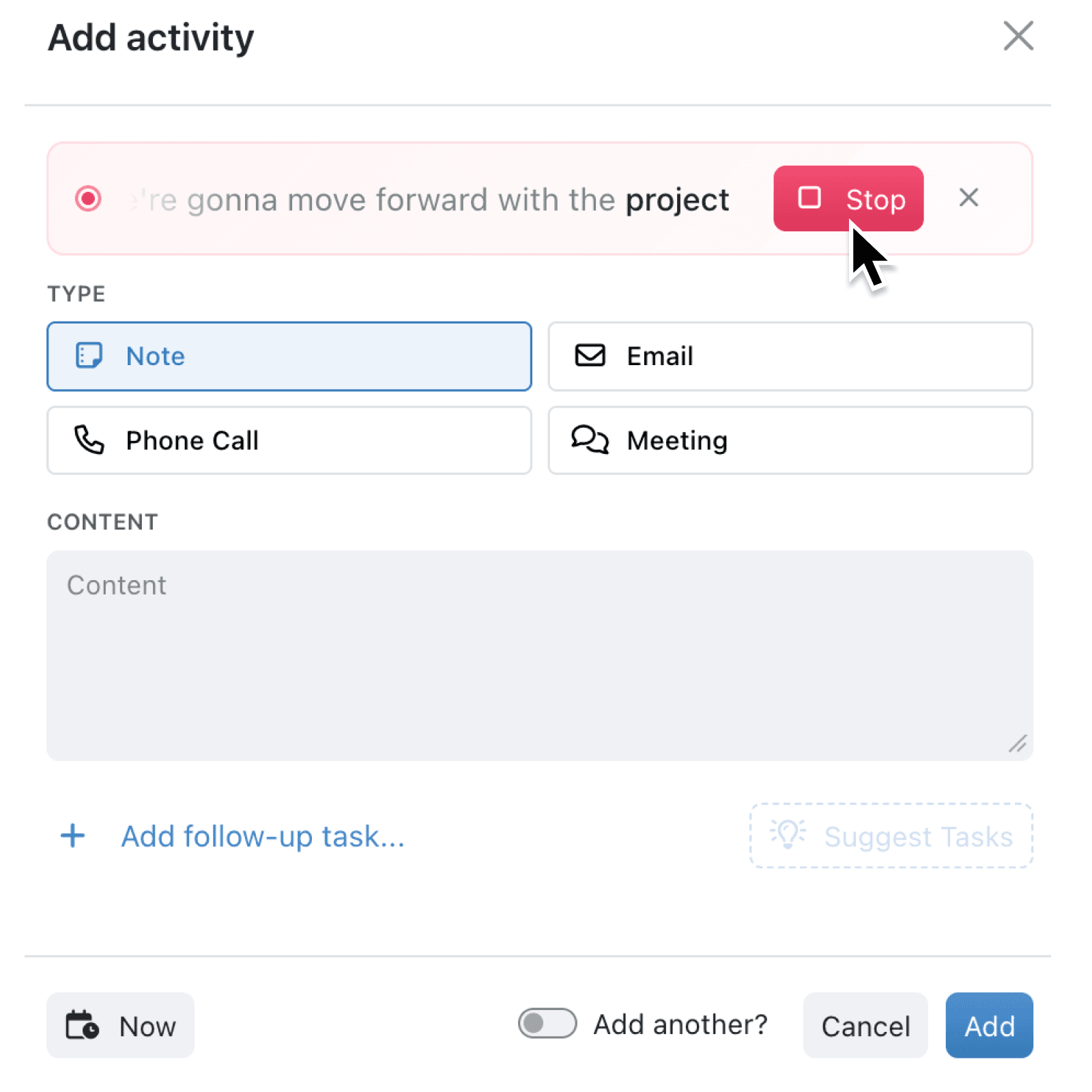
Voice transcription now works in two more places: the add activity and the stage change. Press the microphone, talk naturally, and Kinabase records what you say, cleans it up with AI, and fills in the right place for you. When you log an activity, your words become a clear summary in the Content field and can even suggest follow-up tasks. When you move a record through a workflow, your speech is mapped onto the relevant text fields, ready for you to review before you confirm.
Why it matters:
- Speak instead of type so you can capture a call or meeting note in seconds, even on a phone or tablet in the field.
- Get cleaner notes automatically because the AI tidies filler words, punctuation and casing without changing your meaning or inventing details.
- Turn talk into tasks when logging an activity, with suggested follow-up tasks drawn straight from what you said.
- Keep workflows moving as spoken updates pre-fill stage change fields, so you confirm rather than retype.
How it works:
- Open a record and start a new activity, or choose a workflow action that moves the record to a new stage.
- Look for the microphone button in the top right of the modal and click it. A live banner shows "Listening..." and your words as you speak.
- Talk naturally, then click Stop when you are done, or the cross to discard.
- Kinabase tidies the transcript and fills the Content field, suggests tasks, or pre-fills the stage fields.
- Review the suggested text, accept or dismiss any tasks, and save or confirm as normal.
Note: The microphone appears in the stage change only when that transition includes a text field to fill, so it shows up when it can actually help.
When to use it:
- Sales teams can dictate a call summary the moment they hang up, letting Kinabase suggest the next follow-up tasks automatically.
- Field and service staff can log a site visit by voice on a tablet, without stopping to type long notes.
- Finance managers approving or rejecting an invoice can speak the decision, and have the notes field filled in ready to confirm.
Get started
Open any record, add an activity or trigger a workflow action, and tap the microphone to start dictating.
If you have questions or feedback, we would love to hear from you. Email support@kinabase.com — we're listening.