
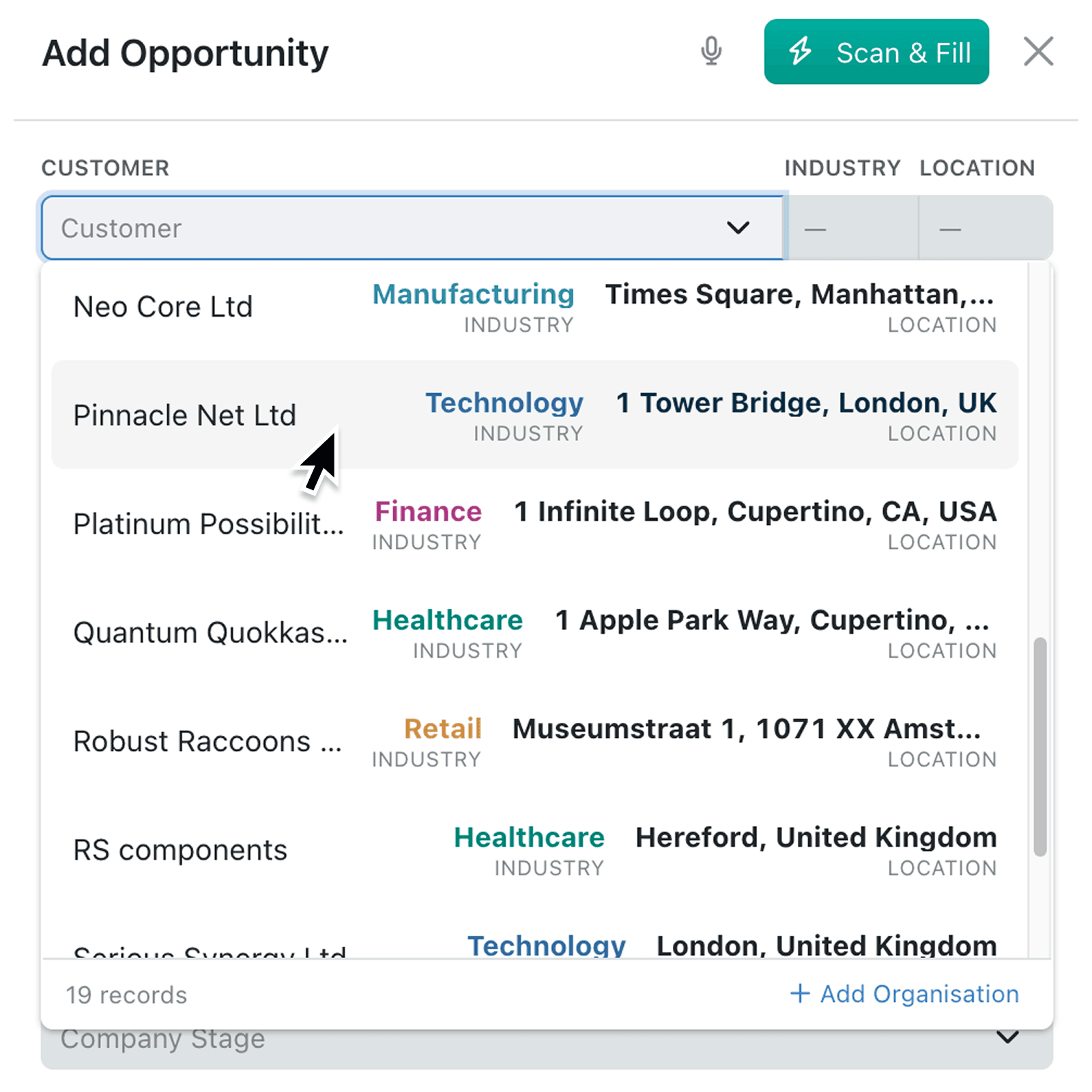
Choosing between records with similar names can slow work down and lead to mistakes. You can now show the details people need directly in the record picker, without making them open each record first.
What's new:
A new Detailed display mode shows a linked record alongside up to four preview fields, such as status, location, category, date or a calculated count. These values appear in the search results and remain visible beside the selected record, using each field's usual formatting, with field colours shown too. Detailed previews are available for single-record fields in Kinabase.
Why it matters:
- Choose with confidence by comparing useful details before selecting a record, even when several options have similar primary or secondary field values.
- Reduce unnecessary navigation by checking key information within the record editor instead of opening records in separate pages or browser tabs.
- Control what people see by configuring the most relevant preview fields for each process. Kinabase only displays fields that the current user has permission to read.
How it works:
- Open the collection that contains the field you want to update, open its options menu and select Configure, then select Fields under Setup.
- Edit a field that links to one record in another collection and open its Input tab.
- Select Detailed under Display. Basic keeps the standard text picker, while Thumbnail shows an image from the linked collection. Detailed is available when the linked collection contains eligible preview fields.
- Select up to four Preview fields, then click Update. The primary and secondary fields are shown by the picker by default. Fields containing files, rich text or multiple values are excluded.
- Open a dropdown and search for a record. Review its formatted preview values, then select it. If Use QR Code Scanning is enabled, you can scan as usual.
Note: A record cannot link to itself when the field points back to its own collection.
When to use it:
- Operations managers can show supplier location, approval status and open order count when staff assign a supplier to a purchase request.
- Sales teams can display account tier, owner and renewal date while linking an opportunity to the correct customer record.
- Client services teams can tailor each picker to show the details that make a process clear for their team, so new starters need less training.
Get started
Open Kinabase and configure a single-record field in your collection to use the new Detailed display mode.
If you have questions or feedback, we would love to hear from you. Email support@kinabase.com - we're listening.