
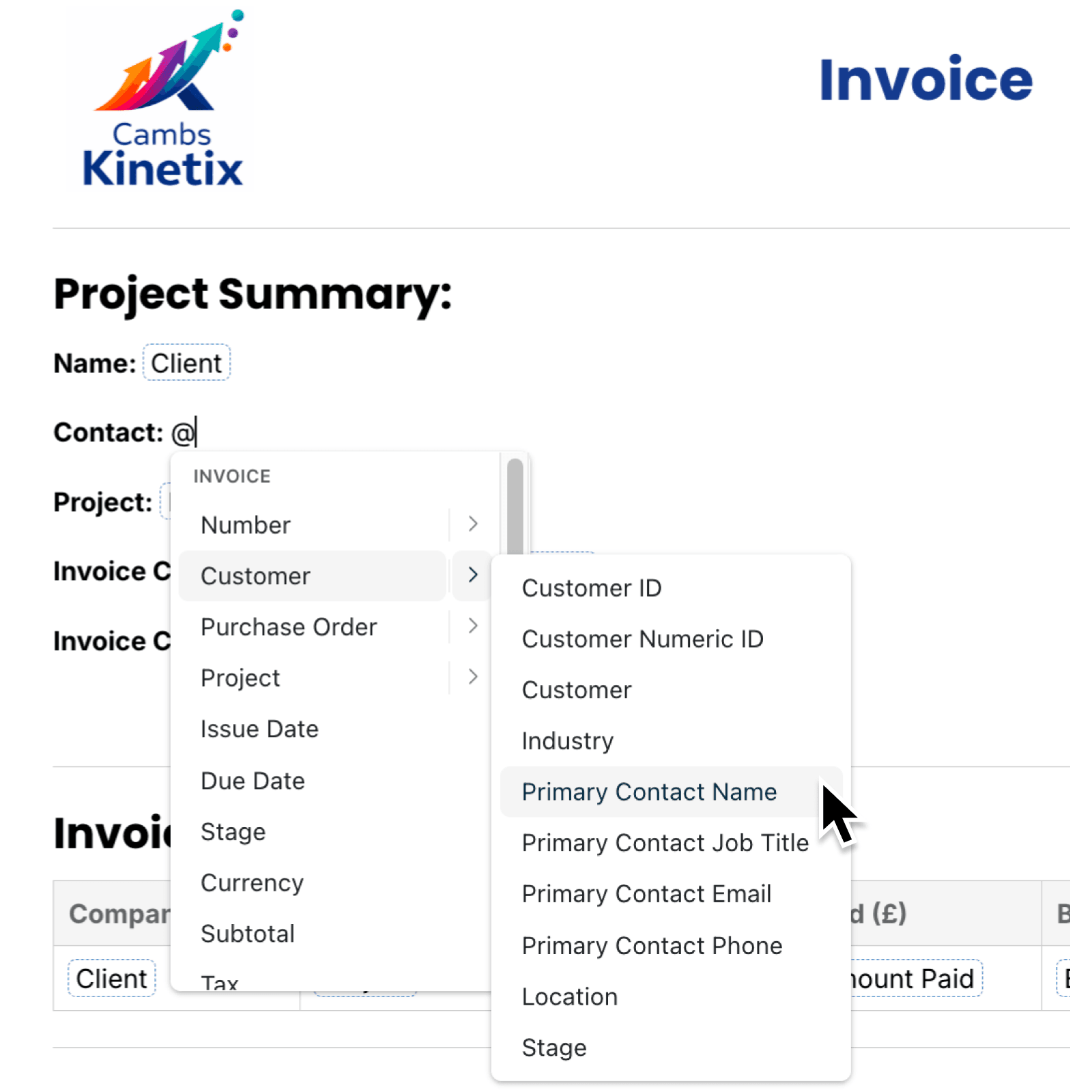
Copying information from related records into a document takes time. You can now include those details directly in a template, so every generated document uses the latest information held in Kinabase.
What's new:
Document templates can now include fields from a record connected through a single-record linked collection field. For example, a task template can include the owner or budget from its linked project.
Open the linked collection field dropdown by typing @ in the editor to see available fields from the linked record. Kinabase displays each selection with a clear label, such as "Project - Owner", in the editor and generated document.
Why it matters:
- Reduce manual copying by building invoices, proposals, reports and operational documents using information already stored in related collections.
- Keep documents accurate since each document uses the current value from the linked record, helping teams avoid outdated names, addresses or account details.
- Manage reporting efficiently as you can include all the relevant information from your linked collections in a single document.
How it works:
- Navigate to your collection, click Configure, then open Documents and Templates.
- Click Add to create a document template, complete its details and click Add again, then click Edit beside it.
- Click in the document and type @ to open the field menu. Start typing a field name to filter the available choices.
- Open the linked collection field's submenu and select the linked field. You can use the pointer, or press the right arrow key, move with the arrow keys and press Enter.
- Preview or generate the document. If no linked record exists, the field stays blank.
Note: The collection needs a linked collection field that connects to one record in another collection that is not reference data.
When to use it:
- Operations managers can add a linked project owner, deadline or location to task packs and delivery notes.
- Sales teams can include current customer details in quotes and proposals without maintaining the same information in two collections.
- Finance teams can include current budget or cost details in the same reports and analyses.
Get started
Open Kinabase and edit a document template from your collection's Documents settings.
If you have questions or feedback, we would love to hear from you. Email support@kinabase.com - we're listening.