
Knowing the result you want is easy. Turning it into the right formula is the slow part, especially when the calculation combines several fields. Kinabase can now write a first draft from a plain-English description, so you start from something to review rather than a blank input.
What's new:
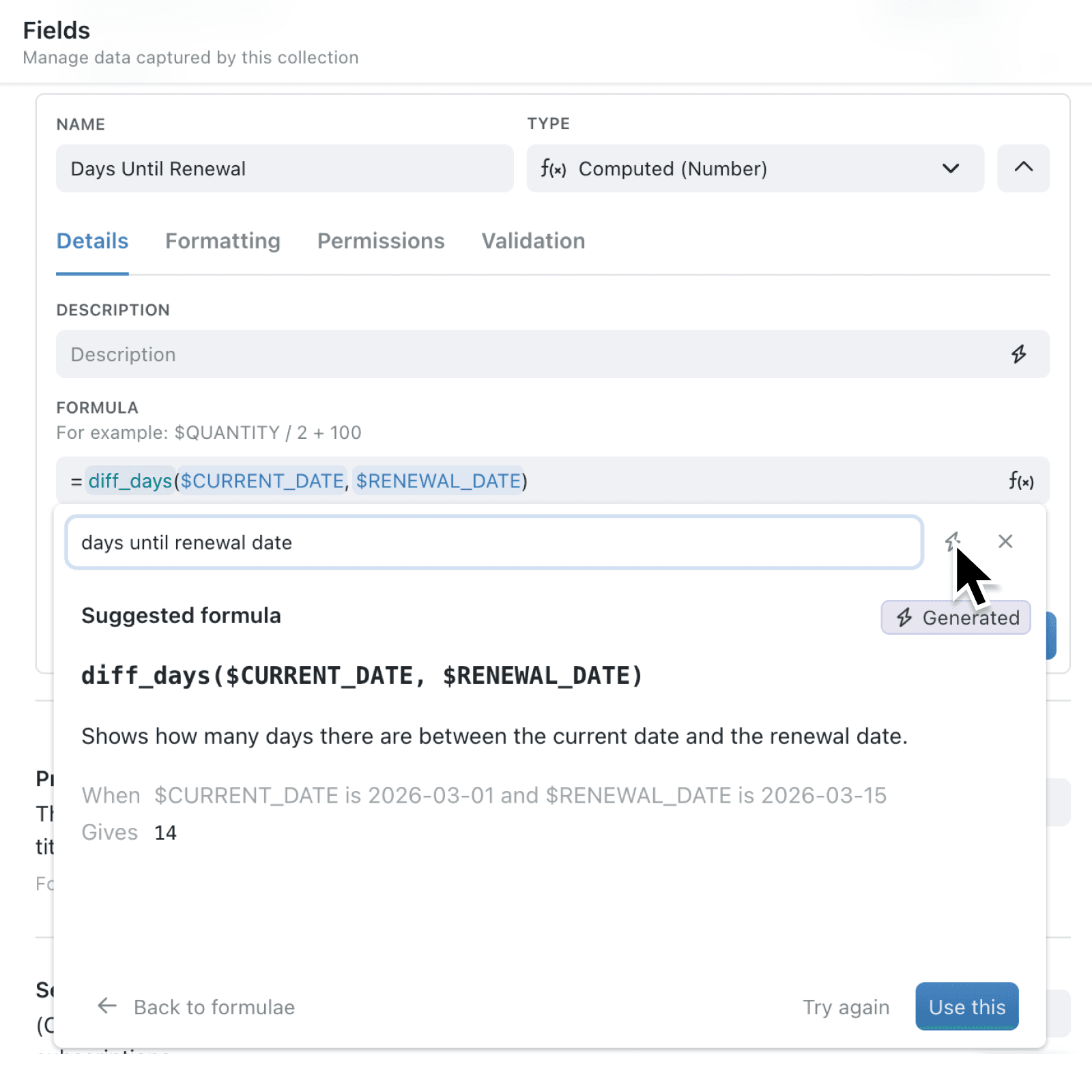
The formula browser now includes Describe it feature. Type what you want the field to produce, click a lightnening icon, and Kinabase proposes a formula, explains it in plain language, and shows a worked example with its sample values under When and the result under Gives.
Nothing reaches your input until you say so. Use this accepts the suggestion, Try again asks for another, and Back to formulae returns you to the catalogue.
Why it matters:
- Describe the outcome rather than the mechanics, then read Kinabase's explanation to understand the formula it proposes.
- Review before anything changes by checking the formula, the explanation, and the worked example while your input stays exactly as you left it.
- Continue working your way by browsing and inserting catalogue formulas as before, or selecting Ask AI to write it when a search does not find what you need.
How it works:
- Open a computed field's Formula or Template input and click fx to open the formula browser.
- Type the result you need into the search box in plain English, then press Enter or click lightning icon next to the search box to activate the Describe it feature.
- Wait while Kinabase prepares a suggestion. Click Stop, or close the browser to cancel generation.
- Read the suggested formula, its explanation, and any When and Gives example.
- Click Use this to place the formula in the input, Try again for a different suggestion, or Back to formulae to browse the catalogue instead.
- Check the preview and any messages below the input, then save the field as usual.
Note: Describe it feature works with numeric formulas and text templates, and needs an input tied to a collection. A suggestion can reference a linked record, but reading a field from that linked record is not supported yet.
When to use it:
- Operations managers can ask for an order value from quantity and unit price without working out the syntax first.
- Client services teams can ask for "days until this contract renews" and get a working calculation in seconds.
- Event and membership teams can describe the badge or booking label they want, then see the explanation to check it still reads properly when someone has no organisation.
Get started
Open a computed field's Formula or Template input, click fx, and describe the result you need.
If you have questions or feedback, we would love to hear from you. Email support@kinabase.com — we're listening.