
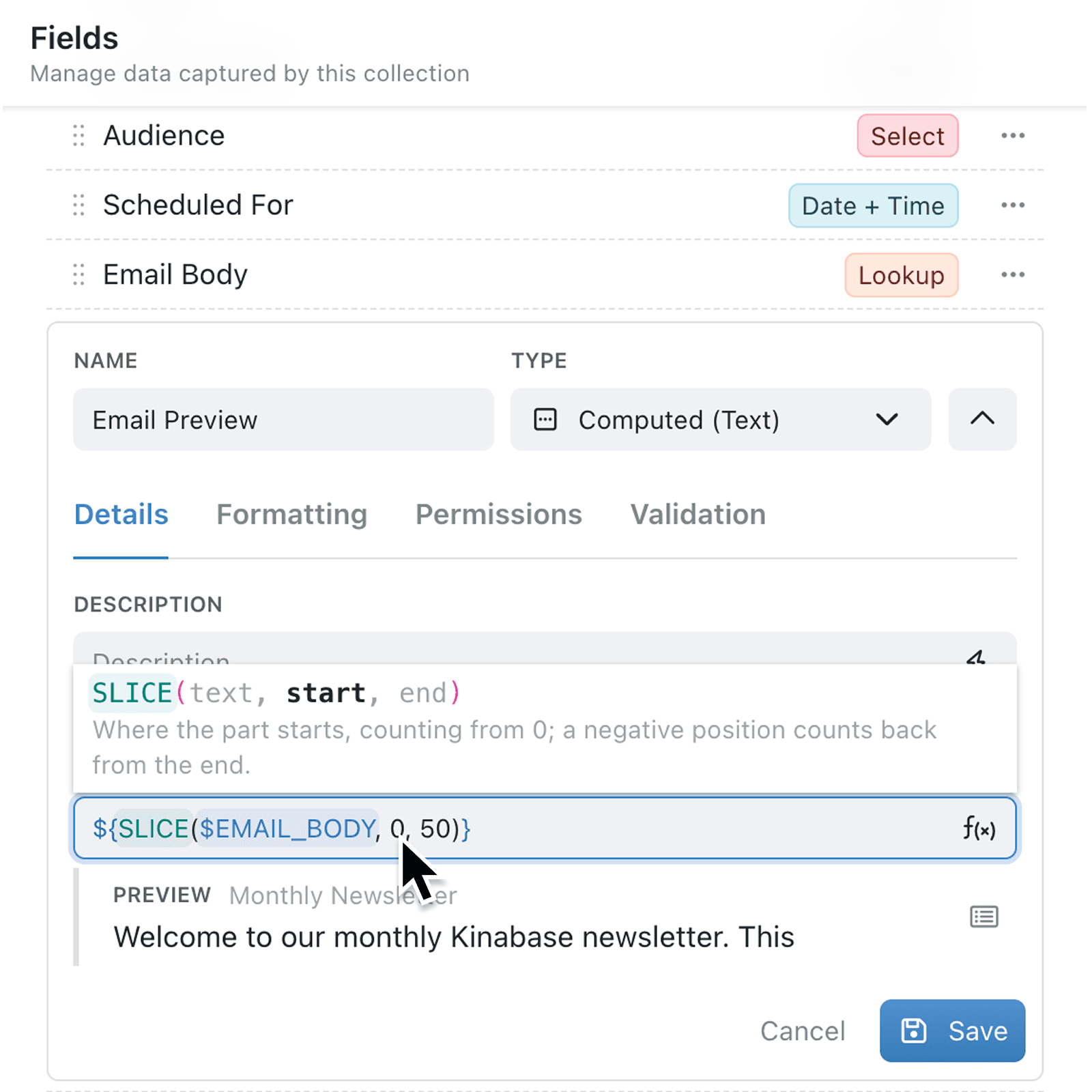
Even a formula you have written before can stall you at the second or third value: which one is the start date, and which is the end? Kinabase now answers that above the input, and narrows the field list to the kind of value the formula is actually asking for.
What's new:
Place your cursor inside a recognised formula and Kinabase shows its structure above the input, highlights the part you are completing, and explains what belongs there. Where that part accepts a fixed set of choices, it explains those too. The guidance follows your cursor through nested formulas and stays visible while the field list is open.
Field suggestions now follow the same understanding. Inside a formula that expects a date, typing $ offers date fields.
Why it matters:
- Fill in the right value by reading what the current part of the formula expects, instead of counting commas to work out where you are.
- Pick from fields that fit as a date-difference calculation offers date fields and a numeric part offers numbers, so a plausible but wrong choice is far less likely.
- Review formulas more clearly by moving through an existing or nested formula and seeing the relevant explanation update with your cursor.
How it works:
- Open a collection's Configure page, click Fields under Setup, and add or edit a computed field.
- Place your cursor inside a formula in the Formula or Template input, or insert one with fx.
- Read the structure shown above the input. The part you are completing is highlighted, with a short description underneath, and any fixed choices are explained.
- Type
$to open the field list and select a field suited to that part. The guidance stays visible while you choose. - Move your cursor between the parts of the formula, including through nested formulas, and the description updates with it. Check the preview, then press Save.
When to use it:
- Operations managers can build a scheduling calculation for quantities, packing, or scheduling while checking exactly what rounding functions expect.
- Client services teams can write computed text with formulas such as
IFandLEFTwhile reading what each part expects. - Project teams can pick up a nested formula written by a colleague and understand each value as they move through it.
Get started
Open an existing computed field and move your cursor between the parts of its formula to see the guidance change.
If you have questions or feedback, we would love to hear from you. Email support@kinabase.com — we're listening.