
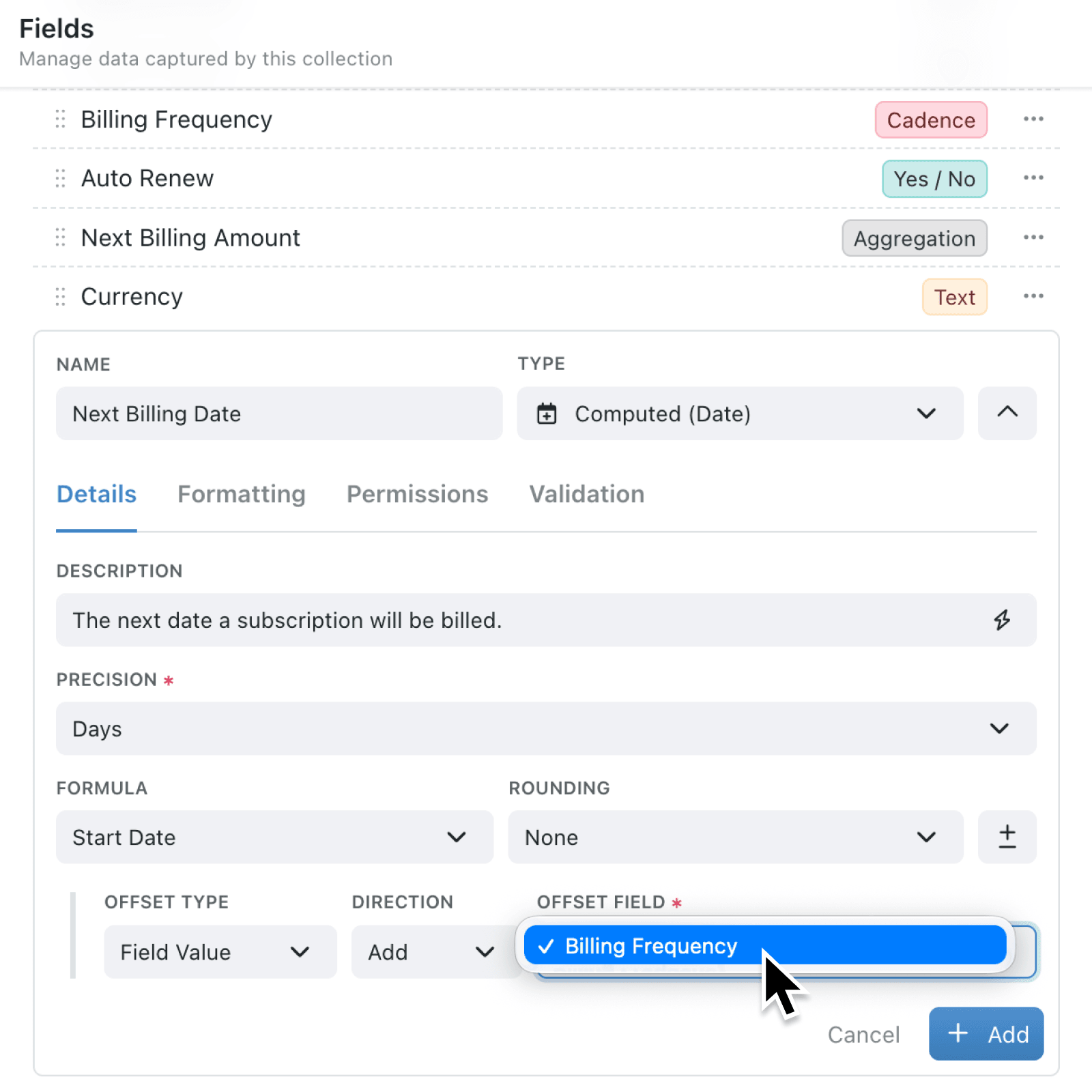
Many processes already store how often work repeats, such as a monthly review or a yearly inspection, but until now Cadence field type was not available for date calculations. Teams copied the same information, or worked the next date out by hand, and the dates drifted when a record's cadence changed.
What's new:
A date Formula can now offset by a Cadence field as well as a Duration, so the next date follows the interval already stored on each record. Weekly, Monthly, Quarterly, Half-yearly and Yearly each move the starting date by that amount, forward or back, while One-off and blank cadences leave the date empty.
The same Offset Field list is used by Computed (Date) fields and by a scheduled automation's Due Date. A Lookup field that copies a cadence from a linked record appears there too.
Why it matters:
- Keep one interval by driving the next date from the cadence already on the record, rather than maintaining a second duration for the same repeat.
- Trust short months as 31 January plus one month becomes the last day of February, and 29 February plus one year becomes 28 February in a non-leap year.
- Leave one-off work empty because a One-off cadence does not invent a follow-up date.
How it works:
- Open the collection, click the options menu (⋯), and select Configure, then under Setup click Fields.
- Add a Cadence field if needed, plus a date field for the starting point, such as last review.
- Click Add field, name the next date, and set Type to Computed (Date).
- Under Formula, select the starting date, click Add Offset, set Offset Type to Field Value, and select the Cadence field under Offset Field.
- Set Direction to Add to move the date forward, or Subtract to move it back.
- Click Add, then set a record's cadence and check the computed date.
When to use it:
- Facilities teams can keep each asset's next service date in step with its own interval, whether that is monthly for lifts or yearly for fire doors.
- Accountancy practices can work out a client's next filing review from the cadence already on their record, instead of maintaining a separate duration field alongside it.
- Membership organisations can schedule renewal reminders from each member's billing cadence, while one-off supporters are left without a follow-up date.
Get started
Open a collection you can configure, add or reuse a Cadence field, then create a Computed (Date) field with Offset Field set to the Cadence field.
If you have questions or feedback, we would love to hear from you. Email support@kinabase.com — we're listening.