
The details an automation needs often live on a linked record - the company behind an opportunity, or the site a job belongs to. Until now, using one of those values in an automation meant adding a lookup field to copy it onto the record first. Automations can now read the linked record's fields directly.
What's new:
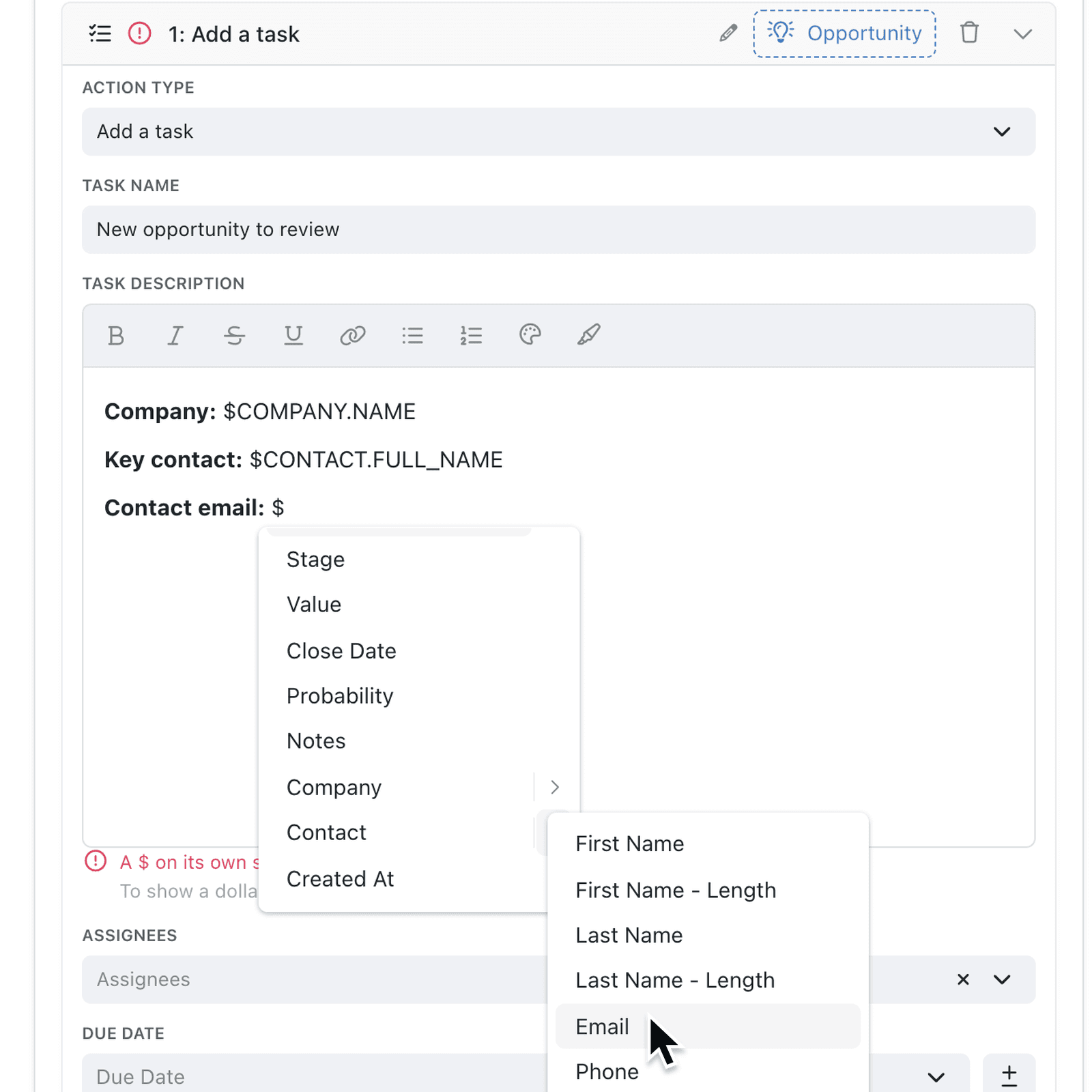
Anywhere an automation step takes an expression - a task's name and description, an email or a notification - you can now reach one link further. Type $, click the arrow next to a link such as Contact and choose one of that record's fields, or type the reference with a dot, such as $CONTACT.EMAIL. Trigger and If... conditions can pick linked fields in the same way.
The same works in a form's Button label and in Choose where this form appears, so a form can name the linked customer on its button or show only for customers in a particular industry.
Why it matters:
- Use the source of truth by reading the value from the record that owns it.
- Build fewer helper fields as there's no need to add a lookup just to use a value in an email or condition.
- Write clearer messages with the customer's name, address or account manager straight from the linked record.
- Trigger more precisely with conditions such as Company's Industry is Technology.
How it works:
- Open Settings → Operations → Automations and open or add an automation.
- Add a step, such as Add a task, and type
$in its name or description. - Click the arrow next to a link - for example Contact - and select one of its fields, such as Email. Kinabase inserts it with a dot, for example
$CONTACT.EMAIL. - Or type the reference yourself in any expression, using the link's name, a dot and the field's name.
- To use a linked field in a condition, select If a field value is... under the trigger, or Add condition in What to do, and pick the field the same way.
- Save the automation.
Note: Only fields on the next record along are offered, and an empty link gives a blank value. A scheduled trigger's Due Date still needs a date on the record itself.
When to use it:
- Recruitment agencies can email a candidate's interview confirmation that includes the hiring company's address, taken straight from the linked client record.
- Facilities teams can raise a task only when a job's linked site is marked High risk, without copying the risk rating onto every job.
- Wholesale distributors can notify the linked account manager by name when a large order comes in from one of their customers.
Get started
Open an automation under Settings → Operations → Automations and type $ in any step to pick a field from a linked record.
If you have questions or feedback, we would love to hear from you. Email support@kinabase.com — we're listening.