
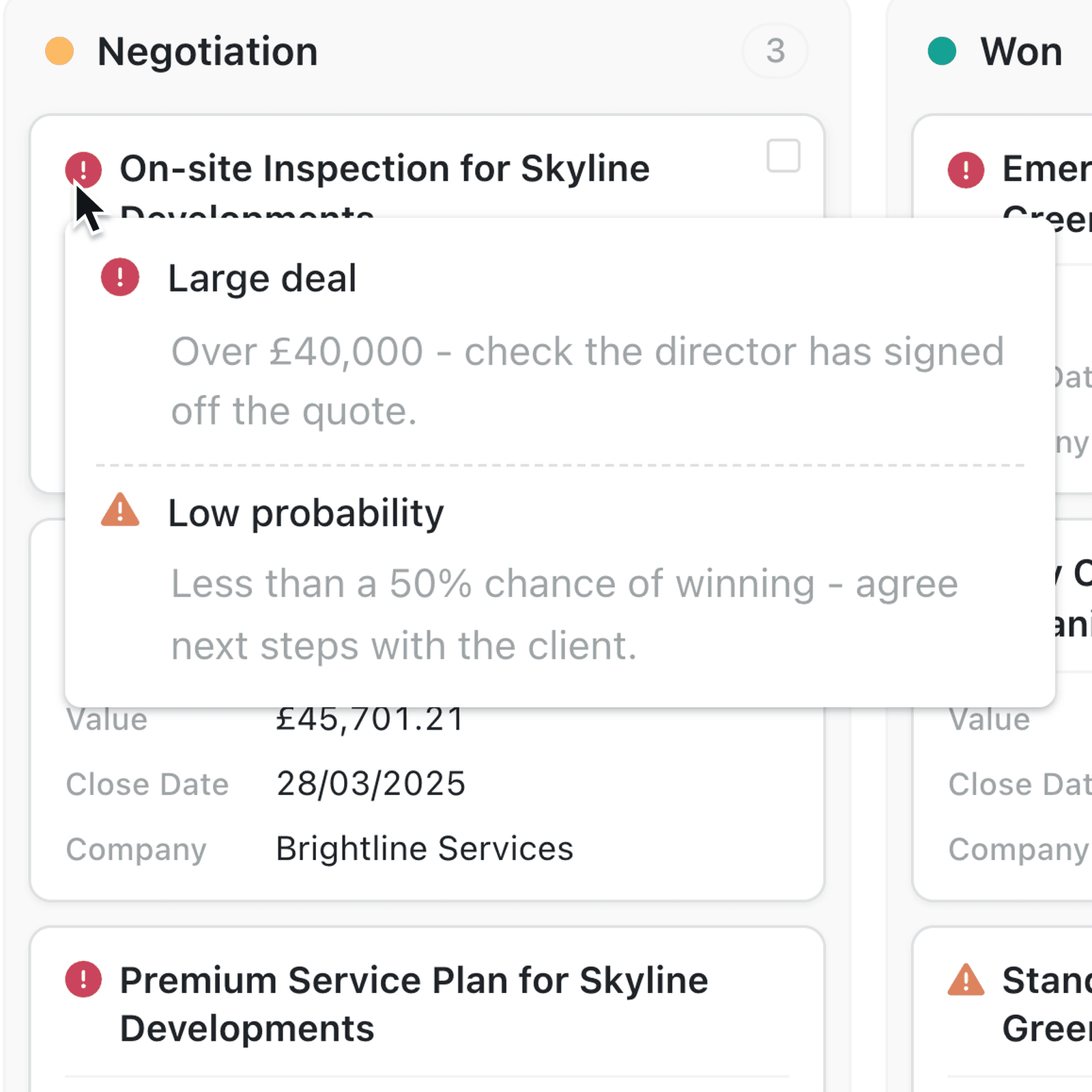
Alerts flag the records that need attention, such as an overdue invoice or an expiring warranty. Until now they showed in the table and on the record, but not on a Kanban board, so you had to open a card to check. Now they're on the card itself.
What's new:
Kanban cards now show a record's alerts. An icon at the start of the card's title shows the most severe alert in its colour, whether Critical, Warning, Info or Success. Hovering over it lists every current alert with its message, most severe first.
There's nothing to set up. Alerts already configured for a collection appear on all of its Kanban views automatically.
Why it matters:
- Spot problems at a glance as you move work across a board.
- See what's most urgent with the most severe alert shown on the card.
- Read the detail without opening the record by hovering over the icon.
How it works:
- Open a collection that has alerts set up.
- Select Display, then Kanban.
- Look for an icon at the start of a card's title.
- Hover over the icon to read every alert on that record.
When to use it:
- Maintenance teams on a job board can see which jobs carry a Critical safety alert before anyone is sent out.
- Sales teams on a pipeline grouped by stage can spot the deals flagged as going cold.
- Lettings teams on a renewals board can see which tenancies are missing an up-to-date gas safety certificate.
Get started
Open a collection that has alerts, select Display, then Kanban, and hover over an alert icon on a card.
If you have questions or feedback, we would love to hear from you. Email support@kinabase.com — we're listening.