
Computed fields
Calculate values and build consistent text automatically
Computed Fields
This guide explains the computed field types and shows you how to write the formulas that power them.
1. The computed field types
There are five computed types, plus Conditional Text for template-driven writing. Two related types – Lookup and Aggregation – pull data from other collections and have their own guides.
| Field type | What it produces | Example |
|---|---|---|
| Computed (Number) | A number from a calculation. | $QUANTITY * $UNIT_PRICE |
| Computed (Text) | Text built from other fields. | Order for $CUSTOMER_NAME |
| Computed (Date) | A date worked out from other fields. | Last review, offset by Cadence |
| Computed (Duration) | A length of time from a calculation. | diff($START, $END) |
| Computed (Select) | An option chosen by a formula. | if($SCORE >= 80, "High", "Low") |
| Conditional Text | Text picked from templates by condition, then filled with record values. | A different quote line for machined vs printed parts. |
To pull a single value from a linked record, use a Lookup field. To roll up totals, averages or counts from many linked records, use an Aggregation field.
2. Create a computed field
1. Open the Fields pane
Open the collection
You'll need Configure permission
Permissionfor the collection. If you're unsure, ask your System admin.The level of access — No Access, View Only, View & Edit or Not Enabled — granted through a Role for a specific area of Kinabase, such as records, tasks or configuration.
2. Add the field
Click Add field, give it a meaningful Name (such as Total Cost), and set the Type to one of the computed types above.
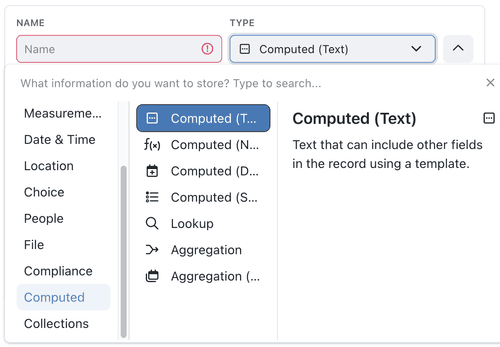
3. Configure the calculation or template
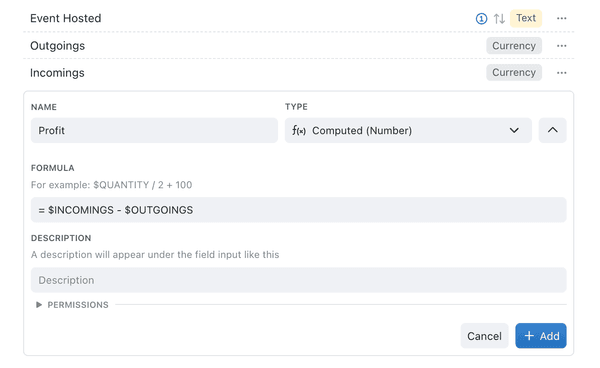
Open the Details tab. For Computed (Text), enter wording and expressions in Template. Other computed types show the settings that apply to their value, such as Formula for Computed (Number). Typing $ opens a dropdown of the collection's fields so you can insert them quickly, and clicking fx opens the formula browser.
4. Check the preview
Pause after typing and read the Preview below the input. Kinabase works out the result against a real record where it can, so you can correct the expression before anyone sees it.
5. Add the field
Correct any message shown under the input, then click Add. When you edit an existing field, click Save. The computed field recalculates whenever the fields it references change.
3. Offset a computed date
A Computed (Date) field uses a date Formula builder rather than a typed expression. You select a starting date from the collection, then optionally add an offset - a fixed amount, a Duration field, or a Cadence field.
Use a Cadence offset when the record already stores how often the work repeats, so the next date follows that interval instead of a second duration you would have to keep in sync.
1. Add the computed date field
Click Add field, give it a Name such as Next review, and set the Type to Computed (Date). Open the Details tab and set Precision to the level you need, such as Days.
2. Select the starting date
Under Formula, select the date field to start from, such as Last review.
3. Add an offset
Click Add Offset. For a duration or cadence already on the record:
- Set Offset Type to Field Value.
- Select the Cadence or Duration field under Offset Field. A Lookup Field Lookup Fieldthat copies a cadence appears in the same list.A Field that pulls a single value from a record connected via a Linked Collection Field, chosen using selection criteria you set — for example, the latest quotation date or the highest risk score.
- Set Direction to Add to move the date forward, or Subtract to move it back.
If the collection has neither a duration nor a cadence field, Kinabase shows the warning No duration or cadence fields available in this collection.
For a fixed interval instead, set Offset Type to Fixed Offset, enter the Offset amount, and select a Unit.
To remove the offset, click Remove Offset.
4. Add the field and check a record
Click Add. Set a record's cadence and open it to confirm the computed date.
A Weekly, Monthly, Quarterly, Half-yearly, or Yearly cadence moves the starting date by that interval. One-off, and a blank cadence, leave the computed date empty.
Short months clamp to the last valid day: 31 January plus one month becomes the last day of February, and 29 February plus one year becomes 28 February in a non-leap year. If the starting date is a month or year, Kinabase counts from the first day of that period. If the starting date includes a time, that time is kept.
The same date Formula builder is used for a scheduled automation's Due Date. See Triggers.
4. Writing formulas
Help while you write
You don't have to write a formula from memory. Three things help as you type:
- Guidance at your cursor. Place your cursor inside a recognised formula and Kinabase shows its structure above the input, highlights the part you are completing, and explains what belongs there - including any fixed choices that part accepts. It follows your cursor through nested formulas and stays visible while the field list is open.
- Field suggestions that fit. Typing
$opens the field list. Inside a formula, Kinabase narrows it to the kind of value that part expects, so a date-difference calculation offers date fields. Outside a formula, it suggests fields that suit the result the whole expression must produce. - Formula suggestions. Type at least two letters where a formula name can begin and matching formulas appear in a Formulae group. Select one to insert its structure with the first value selected.
Click fx beside the input to search the full catalogue instead. See Using the formula browser.
Referencing fields
Reference another field with $ followed by its name in capitals, with underscores for spaces – so a field called Unit Price is $UNIT_PRICE. To read a value from a linked record, chain through the link field with a dot, for example $CUSTOMER.EMAIL. To include a literal $ in text, type $$.
Arithmetic
Use +, -, *, / and ^ (power). Put spaces around operators and use parentheses to control order:
($PRICE * $QUANTITY) - $DISCOUNT
Rounding
round($VALUE)– to the nearest whole number.floor($VALUE)– down to the nearest whole number.ceiling($VALUE)(orceil) – up to the nearest whole number.
Each also takes an optional step, for example round($VALUE, 0.5). Use abs($VALUE) for the absolute value.
Logarithms and trigonometry
Use log(value, base), or the shortcuts ln, log2 and log10. Trigonometric functions sin, cos and tan expect radians – convert from degrees by multiplying by pi/180.
Conditional logic
Use if(condition, then, else):
if($COST > 100, $COST * 0.9, $COST)
Comparisons available: =, !=, <, >, <=, >=. Combine conditions with the boolean operators and, or, not and xor.
Handling empty values
The null-coalescing operator ?? supplies a fallback when a field is empty:
$DISCOUNT ?? 0
Working with units
Measurement and currency fields carry units, and you can use them directly. Append a unit to a number or field reference – both SI and imperial units work, and currency symbols count as units:
$AREA * £400,000/ha
Temperatures are calculated in kelvin. Convert a result with kelvin(x), celsius(x) or fahrenheit(x).
Build text with a template
A Computed (Text) field uses a Template. Ordinary wording stays as written, and $ inserts another field:
Order $ORDER_NUMBER for $CUSTOMER_NAME
Follow a linked record with a dot to use one of its fields:
$CUSTOMER.NAME
Wrap a calculation in ${ }. Spaces around arithmetic operators are required:
Total: ${$QUANTITY * $UNIT_PRICE}
The available text formulae are:
| Formula | What it does | Example |
|---|---|---|
IF(condition, when true, when false) | Chooses text using a condition. | ${IF($QUANTITY > 0, In stock, Out of stock)} |
SLICE(text, start, end) | Takes text between character positions. The first position is 0, and the end is optional. | ${SLICE($REFERENCE, 0, 3)} |
LEFT(text, length) | Takes a number of characters from the start. | ${LEFT($PRODUCT_NAME, 3)} |
RIGHT(text, length) | Takes a number of characters from the end. | ${RIGHT($REFERENCE, 4)} |
UPPERCASE(text) | Changes text to uppercase. | ${UPPERCASE($CUSTOMER.NAME)} |
LOWERCASE(text) | Changes text to lowercase. | ${LOWERCASE($EMAIL)} |
CHARACTERCOUNT(text) | Counts the characters and returns a number. | ${CHARACTERCOUNT($REFERENCE)} |
Use ?? to supply text when a value is blank:
Contact: ${$DISPLAY_NAME ?? "Not supplied"}
To show a dollar sign rather than start a field reference, type $$. For example, Cost: $$50 displays as Cost: $50.
SLICE, LEFT, RIGHT, and CHARACTERCOUNT treat emoji and combined characters as complete characters rather than splitting them.
Working with dates and durations
On a Computed (Date) field, add or subtract time with the date Formula builder rather than by typing these functions. See Offset a computed date.
In typed formulas, add or subtract time using the duration functions days(n), weeks(n), months(n), years(n), and so on:
$START_DATE + days(30)
Measure the gap between two dates with diff(from, to) (add a third argument for a directional result), or the shortcuts diff_days, diff_weeks, diff_months, diff_years. Snap a date to a boundary with functions such as startOfMonth(d) and endOfWeek(d). now() returns the current date and time.
Function reference
Every function you can use in a formula:
- Numbers:
round,floor,ceiling/ceil,abs,log,ln,log2,log10,sin,cos,tan,kelvin,celsius,fahrenheit. - Text templates:
IF,SLICE,LEFT,RIGHT,UPPERCASE,LOWERCASE,CHARACTERCOUNT. - Logic:
if. - Dates:
now,startOf…/endOf…(per unit),diff,diff_days/diff_weeks/diff_months/diff_years, and the duration buildersdays,weeks,months,years(and finer units). - Across records:
sum,average,count,accumulate,any,all,filter,intersect,union.
This is the full, supported set. Some names you may see referenced elsewhere – a
lengthfunction,mode, or ajoinfunction – are not available; useCHARACTERCOUNTfor the length of text. Click fx beside an input to see the entries available there, with a worked example for each.
5. Previewing your expression
Expression inputs are tinted as you write: field references, formula names, and the braces around formula sections each take a subtle colour, so a long expression is easier to read. The tint steps aside while you select text.
Below the input, the Preview evaluates a valid expression shortly after you stop typing.
Preview against a real record
Where the collection has records, Kinabase uses one and names it beside the Preview. To test a different one:
- Click the list icon beside the Preview to open Preview with a different record.
- Select a record from the menu, or use Find a record to search for the exception you want to check.
- Read the updated result.
If the collection has no usable record, the preview is labelled Example values and uses stand-in data - Example for text and 42 for numbers. An empty or invalid expression shows Nothing to preview yet. When a real record is in use and the formula can't produce a result for it, the preview stays blank rather than falling back to example values.
The preview follows the field's number units and unit overrides, its duration display format, and True or False results, so it shows what colleagues will actually see.
Messages below the input
Kinabase explains problems as you write rather than at save time. A bare comparison in a number formula prompts you to put it inside if(), because a comparison gives true or false rather than a number. A required formula left blank only reports an error once you have visited the field, so a newly added field doesn't show an error before you've written anything; a formula that may return nothing warns you straight away.
Previews are also available when you configure formula-based default values and Conditional Text templates.
6. Tips
- Offset a Computed (Date) field by a Cadence field when the interval already lives on the record.
- Use the Preview to check a routine record and an awkward one before you save.
- Click fx when you need a formula's structure or a worked example.
- Use parentheses generously so operations happen in the order you intend.
- Reference fields in capitals with underscores, for example
$FIRST_NAME. - Include units in numeric calculations where they matter, for example
$MILEAGE * £3.50/mi. - Add a clear Description to complex computed fields so colleagues understand them. See Configuring fields.
Need more help? Ask your System admin, or contact our support team via Help & Support.