
Triggers
Choose the event that starts an automation
A trigger is the event that starts an Automation
Automations are created under Settings → Operations → Automations. You'll need to be a System admin.
To set a trigger, open the automation editor and, under When to trigger, complete the Whenever… statement.
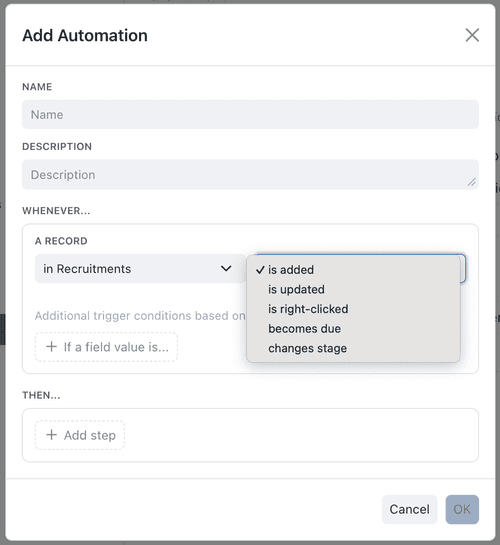
1. The six triggers
Record Added
Runs when a new Record
Use it to: create a welcome task when a new client is added, or notify a team when a support case arrives.
Record Updated
Runs when a record is edited. You can narrow it to a Specific Field so it only fires when that field changes.
Use it to: email the account owner whenever a deal's Value field changes, or flag a record when its Status is edited.
Manual
Runs when a user selects the automation from the Actions button at the top of a record's Details tab, from Actions in its Info panel, or from the record's right-click menu - so it fires only when someone chooses to run it. You can set the Action Appearance (its menu name and icon) and, under Require Confirmation, whether users see a preview before it runs. Automations that open a form are tagged Form in Actions.
Use it to: let staff run an on-demand action such as "Generate quote PDF" or "Copy record link", exactly when they need it.
Scheduled
Runs relative to a date on each record. In Whenever..., select the collection and becomes due, then set Due Date to a date field (or a formula based on one). The formula can add or subtract a Duration or Cadence field, so follow-up work follows each record's own interval. See Computed fields.
Use it to: email a customer three days before their Renewal Date, create a follow-up task on a record's Review Date, or schedule the next inspection from each record's cadence.
Kinabase has no cron-style schedule. The Scheduled trigger is always relative to a date field on each individual record, so different records run at different times.
If the automation's own steps move that date on, Kinabase keeps it to one run a day. See When a step writes the due date.
Stage Change
Runs when a record moves between Workflow
Use it to: generate an invoice when a job reaches Complete, or notify a reviewer when a record enters Needs Review. See Workflows.
Billing Health
Runs when a subscription's billing health changes - for example to Suspended, Needs review, or Failed.
Use it to: raise an internal task when a customer's payment fails.
Billing Health is a newer, limited trigger available only when subscription billing is enabled for your organisation. If you can't see it, contact our support team.
2. Narrow a trigger with conditions
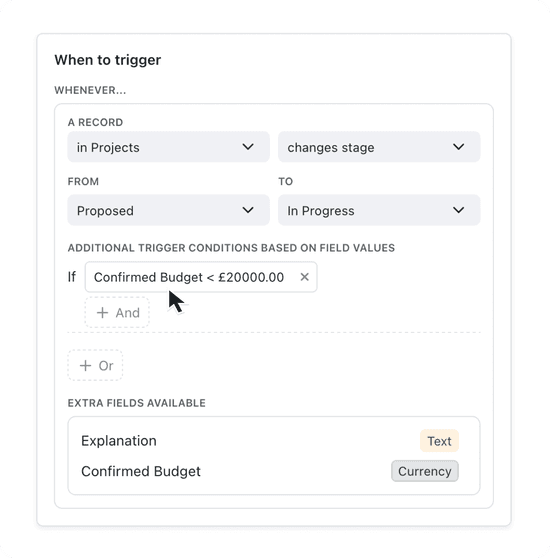
A trigger fires on every matching event. Conditions let you decide whether the automation actually runs for a given record - so a Record Updated trigger, for instance, only acts on high-priority records.
1. Add a condition
Under the trigger, use If a field value is… to start a condition, then pick a field, an operator, and a value - for example Priority is High.
2. Combine conditions
Add further conditions with And / Or to build precise rules, such as Priority is High and Company is Acme.
Conditions can't depend on who is signed in, because an automation may run without a logged-in user (for example, on a schedule or a bulk import).
3. Branching within an automation
Beyond trigger conditions, the steps of an automation can branch. Using If, Otherwise if, Otherwise and End, you can run different steps depending on a record's values - for example, send one email if an order is over £1,000 and a different one otherwise. You build these branches in the What to do section alongside your steps; see Automation Steps.
4. When a step writes the due date
Some scheduled automations move their own date on each time they run - a monthly invoice, a quarterly review, or a chase that books the next follow-up. When an Update the current record or Create a new record step writes the date the trigger reads, Kinabase makes sure the automation runs at most once a day for each record.
1. Check the step when you save
Kinabase checks the gap between runs while you edit the automation:
- A daily or slower repeat - daily, weekly, monthly, quarterly - saves as normal.
- A gap of less than a day won't save, unless the trigger has extra conditions. The message on the step tells you the shortest gap that will work.
- A gap Kinabase can't measure - because it depends on the record, or the date comes from a computed, lookup or aggregation field - shows a warning, but you can still save. The same applies when the trigger has extra conditions that may stop the next run.
2. What happens when it runs
The current run always completes. If the next run would fall less than a day later, Kinabase books it for a day after this run was due instead. The date stored on the record stays as the step set it.
Dates you change by hand, and bookings made outside the scheduled run, keep the time you set.
Need more help? Ask your System admin, or contact our support team via Help & Support.