
Deleting and Restoring Records
Delete records safely, with a 30-day safety net
Deleting a Record
Deleting a record needs Records Permission
Permissionfor the collection; deleting several at once also needs the Bulk Delete permission. See Assign roles and permissions if the option is missing.The level of access — No Access, View Only, View & Edit or Not Enabled — granted through a Role for a specific area of Kinabase, such as records, tasks or configuration.
1. Deleting a record
1. Open the record
In any collection, click a record to open its detail view.
2. Open the options menu
Click the options menu (⋯) in the top-right of the record.
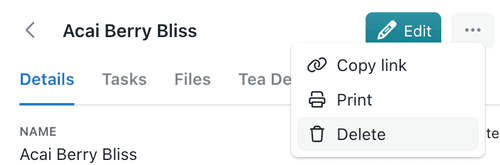
3. Select Delete
Kinabase asks "Are you sure you want to delete {record}?" and confirms that deleted records can be restored within 30 days from the Recently Deleted pane. If other collections hold data linked to this record, the confirmation also lists what will be affected.
4. Confirm
Click Delete to confirm, or Cancel to back out. The record disappears from the collection immediately and moves to Recently Deleted.
To delete several records in one go, see Bulk operations - bulk deleting needs the separate Bulk Delete permission.
2. Recently Deleted
Every deleted record is stored for 30 days before it's permanently removed, giving you a safety net to put back anything deleted by mistake.
1. Open Recently Deleted
Open the collection's ⋯ menu and select Recently Deleted.
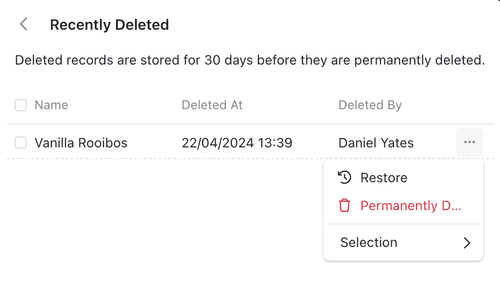
2. Find the record
Deleted records are listed with their ID, primary field, Deleted At date, and Deleted By colleague. Collection lists have their own tab within the same pane.
3. Restore or permanently delete
Right-click a record (or tick several and use the Selection menu) and select Restore to bring it back exactly as it was, or Permanently Delete to remove it for good.
Permanently deleting a record also permanently deletes any activities, tasks and documents associated with it. This action cannot be undone.
3. Records vs collections
Records and collections behave differently when you delete them, so it's worth knowing the difference:
- Records go to Recently Deleted and can be restored for 30 days, as described above.
- Collections cannot be archived and have no recovery window - deleting a collection removes it, and every record in it, immediately and permanently. See Managing collections before you delete one.
Recently Deleted gives you room to undo a mistake, while permanent deletion - for a single record or a whole collection - is there when you're certain the data should go for good.
Need more help? Ask your System admin, or contact our support team via Help & Support.